BaseBid Command
Bid it. Build it. Bill it.
The system for construction contractors who do government and commercial work. Bids, IDIQs and task orders, projects, monthly reports, subcontractors, certified payroll, site access and pay apps, linked and shared with your whole team through your own drive.
AI that works for you, on your terms. Drop in a solicitation and the assistant pulls out key dates, evaluation factors, page limits and risks, builds the compliance matrix, runs a Go/No-Go review and checks your draft against the requirements. It also writes RFIs and meeting notes and fills forms from an email or PDF. Use Claude, ChatGPT, Gemini or Grok with your own key, or run it free on your computer. Every result is a suggestion you review. How the AI works
- 41 linked tabs in the suite
- 10 apps, from $79
- $0 a month, ever
- AI built in, optional, your own key
- 8 Base Bid data files included
New in version 1.4
AI assistant · optional
Bring your own AI. Keep your judgment.
Connect Claude, ChatGPT, Gemini or Grok with your own key, or run Ollama free on your computer. The assistant drafts notes and RFIs, fills a form from an email, PDF or link, analyzes a solicitation into key dates, evaluation factors, page limits, risks and a compliance matrix, runs a Go/No-Go review and checks a proposal draft against the requirements. Every result is a suggestion you review, with Undo. Amounts, dates and links it cannot match to your source are flagged. Private fields are never sent. Switch it on or off any time.
AI provider fees apply if you use it: your provider bills you directly under its own API pricing, usually a cent or two per use. Ollama is free. Everything else works with AI off.
Data included
Every Base Bid data file comes with it.
Each purchase includes the Vehicles & Teaming Index, GSA Lease Refresh Watchlist, VA Capital Plan Outyear, PBS Prospectus Tracker, 12-Month Recompete Calendar, Agency Directory and both grader kits, plus every new edition released in the next 12 months. Import only the rows you want: pick agencies, states or regions and tick them. A newer edition updates the same records instead of making copies, and never overwrites your edits.
Bring your own records too: Outlook, Google and LinkedIn contacts, QuickBooks customers and vendors, Procore and BuildingConnected directories, payroll lists, SAM.gov and USAspending downloads line up automatically.
Agency directory
Every construction buying office, in its real hierarchy.
718 federal offices that buy construction and A/E work, placed in the official SAM.gov hierarchy: Department, Agency, Command, Office. Search Savannah, NAVFAC or an AAC code, tick the offices you work with, and each becomes a client with its AAC or DoDAAC, address and parent organizations linked, so a division lists its districts.
Lookups need no AI: type a UEI for the SAM.gov registration, a notice or solicitation number for the SAM.gov notice, or a contract number for the USAspending award, and review what fills in.
The whole job, one system
Bid it
- Bids & opportunities — SAM.gov notice ID, eBuy RFQ, solicitation #, vehicle, set-aside, Pwin
- Go / no-go checklist and score
- Optional AI: solicitation analysis, compliance matrix, Go/No-Go review, draft check
- Past awards, likely competitors and a price check from USAspending
- Proposals — volumes, compliance matrix, color reviews
- Estimates by CSI division with overhead, profit and bond
- Sub & supplier quotes leveled by trade
- Teaming partners, NDAs and teaming agreements
Contract it
- Federal agency directory with parent organizations and AAC codes
- Umbrella IDIQs, MATOCs, MACCs and BPAs with capacity remaining
- Task orders and contracts under each vehicle
- Change orders, REAs and modifications
- Option dates, completion dates and CPARS
- Invoicing instructions saved by client and reused on every job
- Security requirements saved by agency, with their forms
Build it
- Projects with planned versus actual progress
- Kickoff and pre-construction conference checklist
- Meeting minutes with attendees and action items
- Monthly report builder and month-by-month tracker
- Deliverables, schedule and milestones
- RFIs, submittals, daily reports, safety and punch list
Bill it & stay compliant
- Pay apps with retainage and previous billings
- Weekly certified payroll in WH-347 format, filled from timesheets
- Subcontractors — insurance, license, SAM expirations, subcontracts, sub pay apps
- Clearance and site access — request to cleared on site
- Certifications, licenses, bonding and training
- Documents, drawings, specs and every government, A/E and sub POC
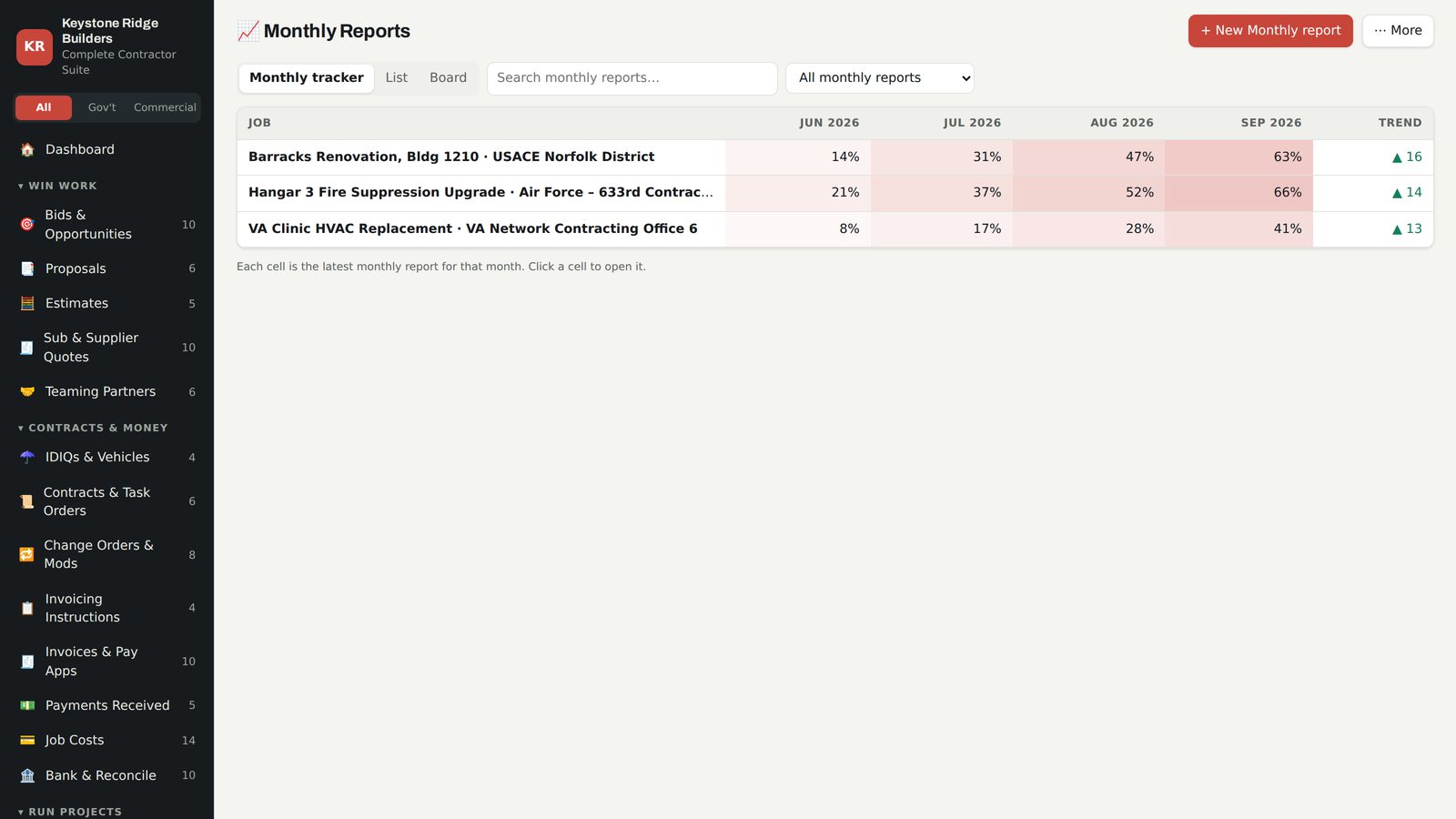
Monthly reports
The monthly report writes half of itself.
Pick the project and billed-to-date and approved changes fill in. Print it and the report pulls in deliverables, upcoming activities, open action items, changes, RFIs and submittals, with a signature block for the government or owner. The monthly tracker shows every project month by month.
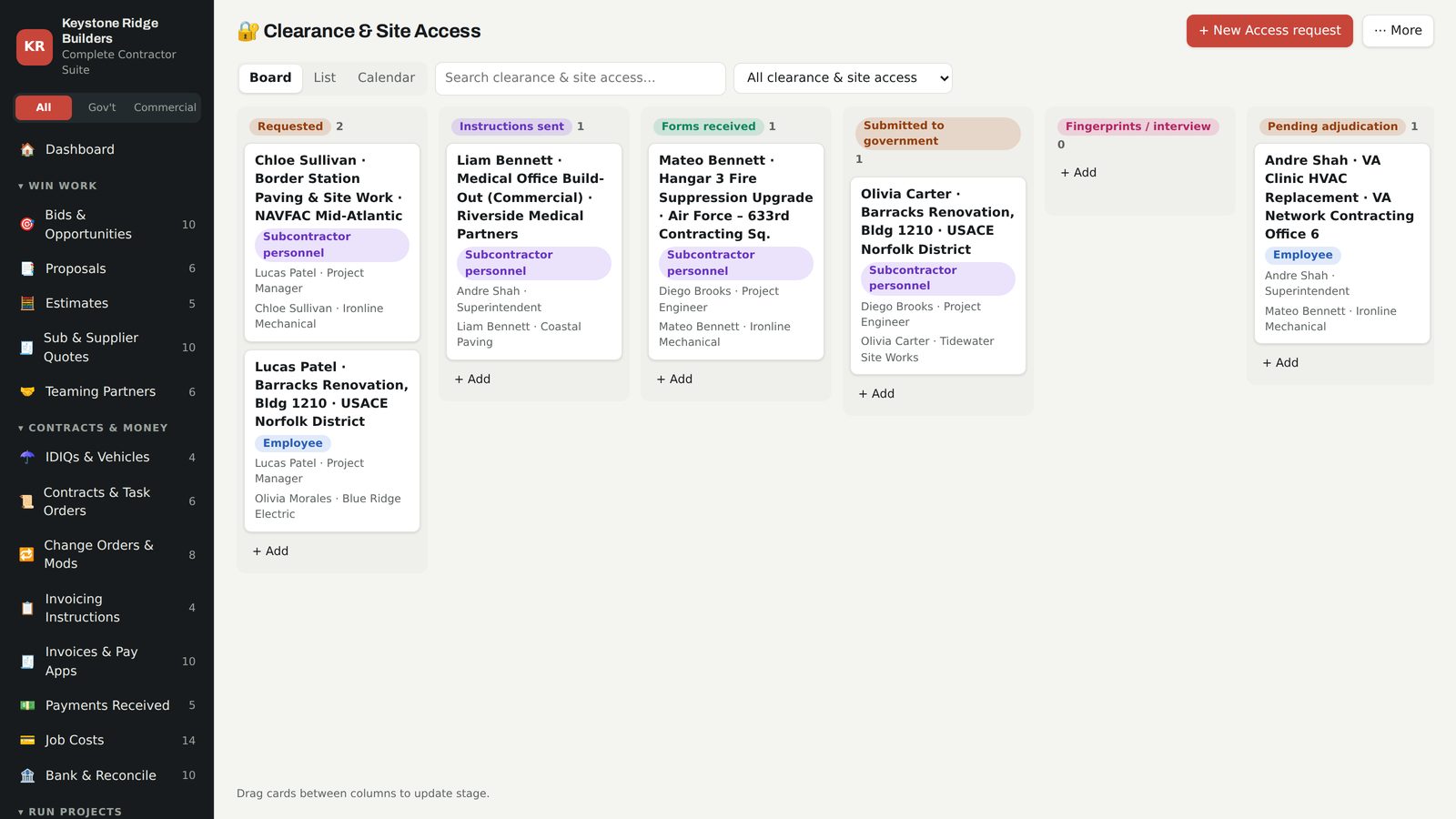
Clearance & site access
Badges before mobilization, not after.
Save each agency's access instructions and forms once — base pass, PIV, public trust or clearance. Every new job for that client picks them up. Send the right instructions to employees and subcontractor personnel in one click and track each person from request to cleared to work on site.
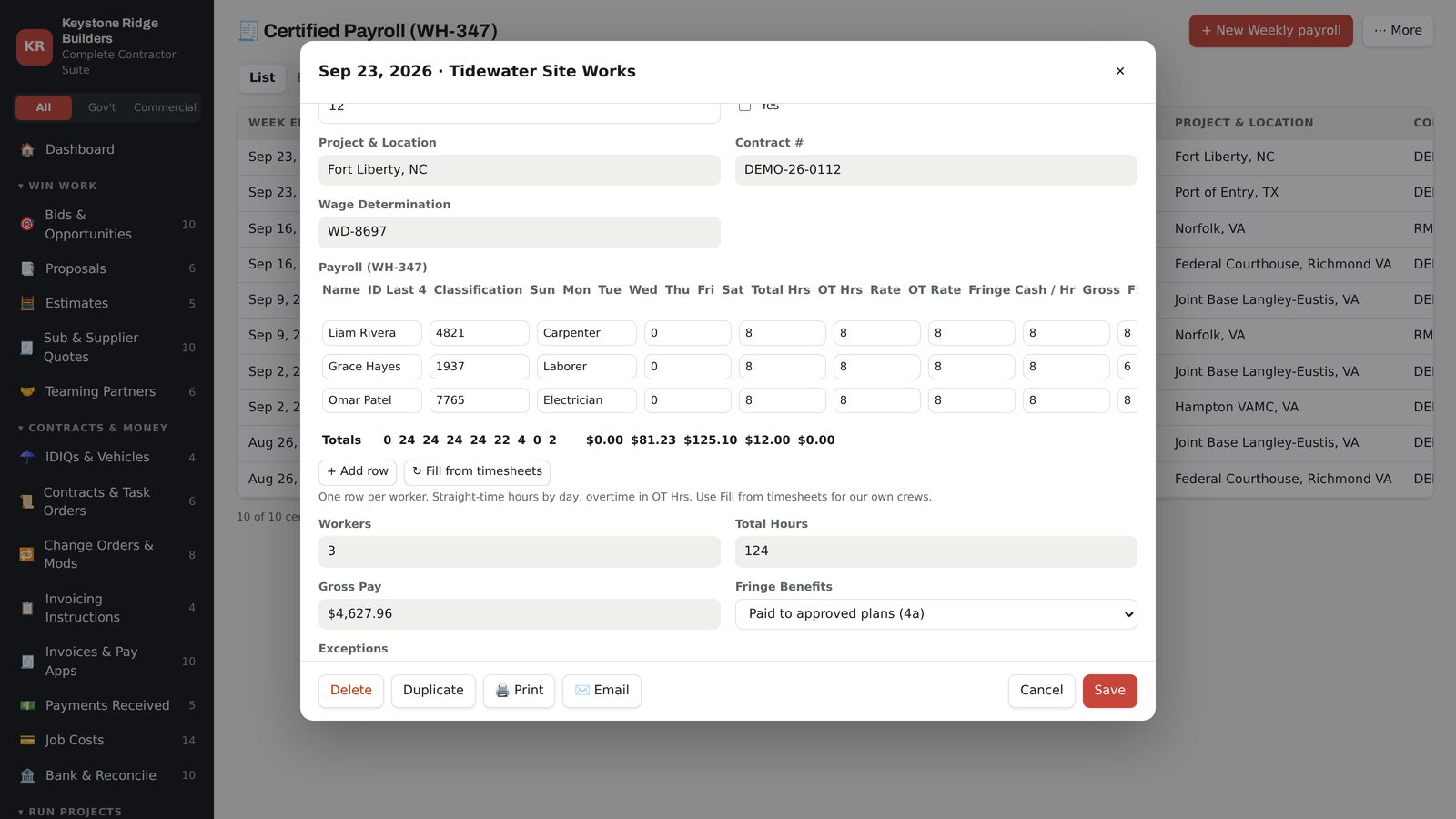
Weekly certified payroll
The weekly wage report, built from the timesheets.
Pick the job and the week ending, click Fill from timesheets, check rates and overtime, and print the payroll in WH-347 format with the statement of compliance. Subcontractor payrolls are tracked beside yours, with alerts for anything missing or needing corrections.
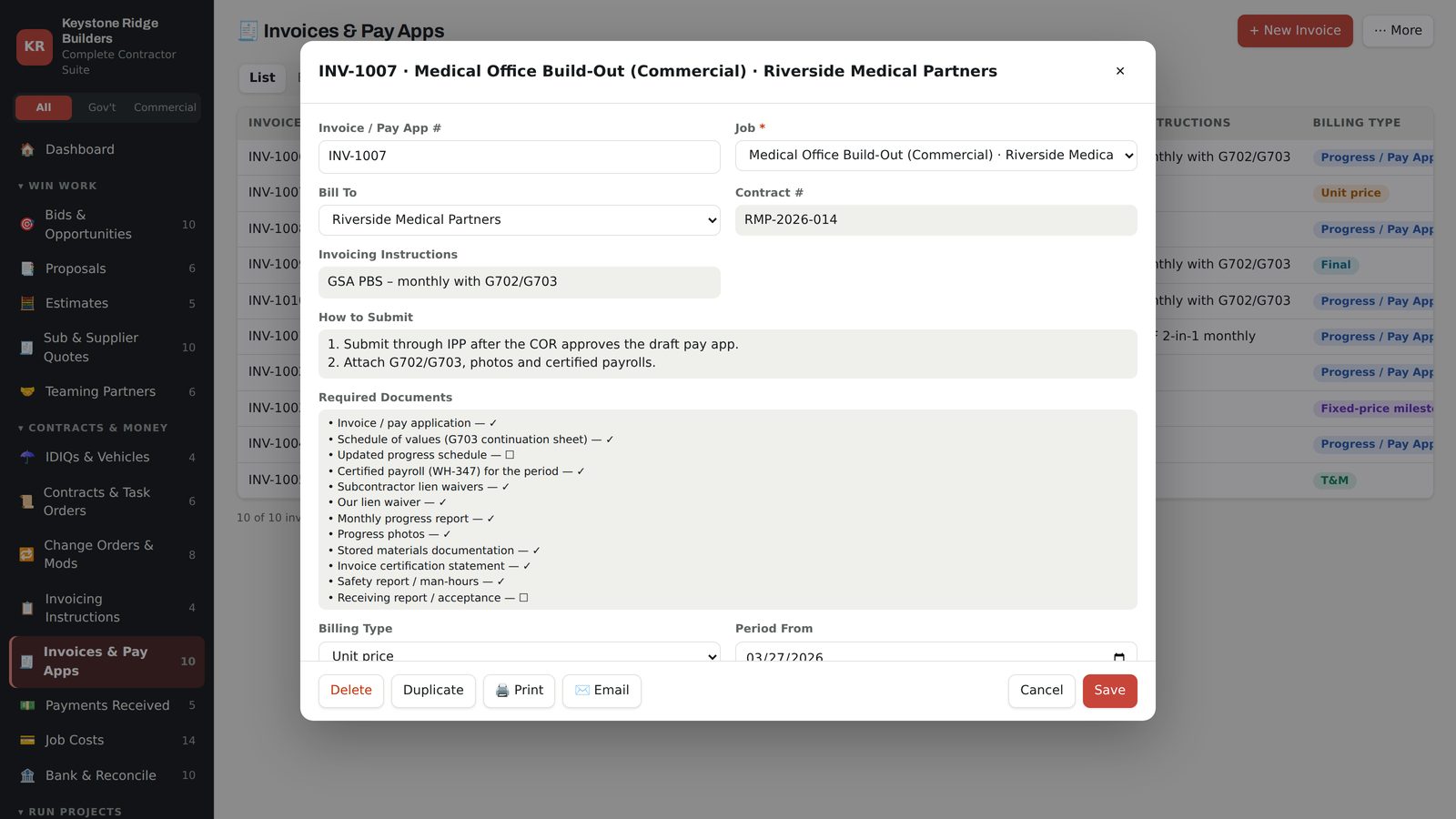
Invoicing & pay apps
Every client bills differently. Save it once.
WAWF, IPP, the VA Financial Services Center, an owner portal or AIA G702/G703 by email: store the steps, where to submit and the documents each pay app needs, and they appear on every invoice for that client. Retainage and previous billings do the math. Add a Stripe, PayPal or Square link and invoices print with a Pay now QR code.
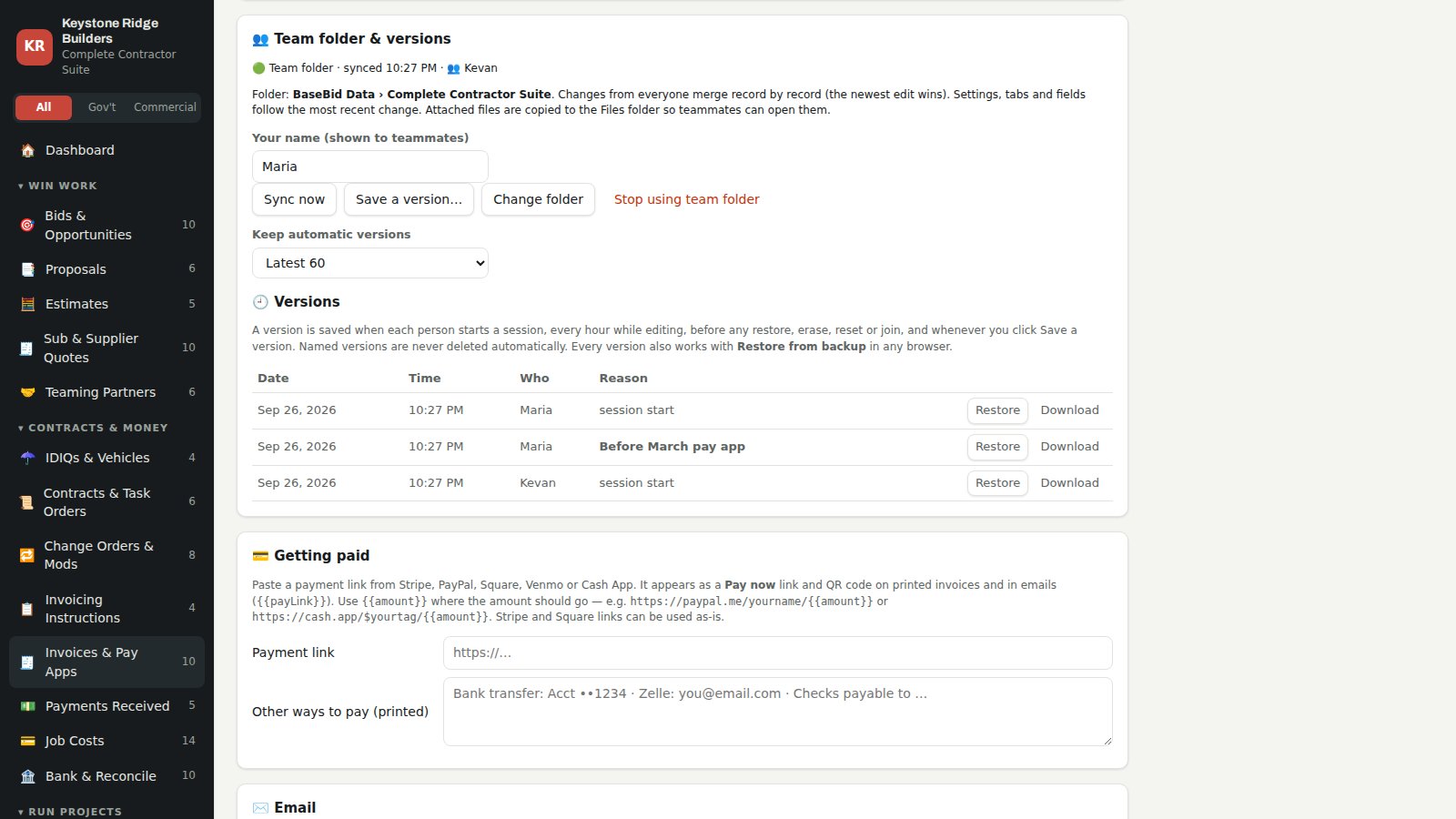
Team folder & versions
The whole team on the same data. No server, no monthly fee.
Pick a folder in your Google Drive, OneDrive or SharePoint, Dropbox, Box or iCloud once. Your PM, super and office manager open the same app and work from the same records. Edits combine record by record, and every record shows who changed it last. Every session is saved as a dated version, and any version can be restored for the whole team in two clicks. Set your logo, colors and business details once, and every BaseBid app uses them.
Government and commercial
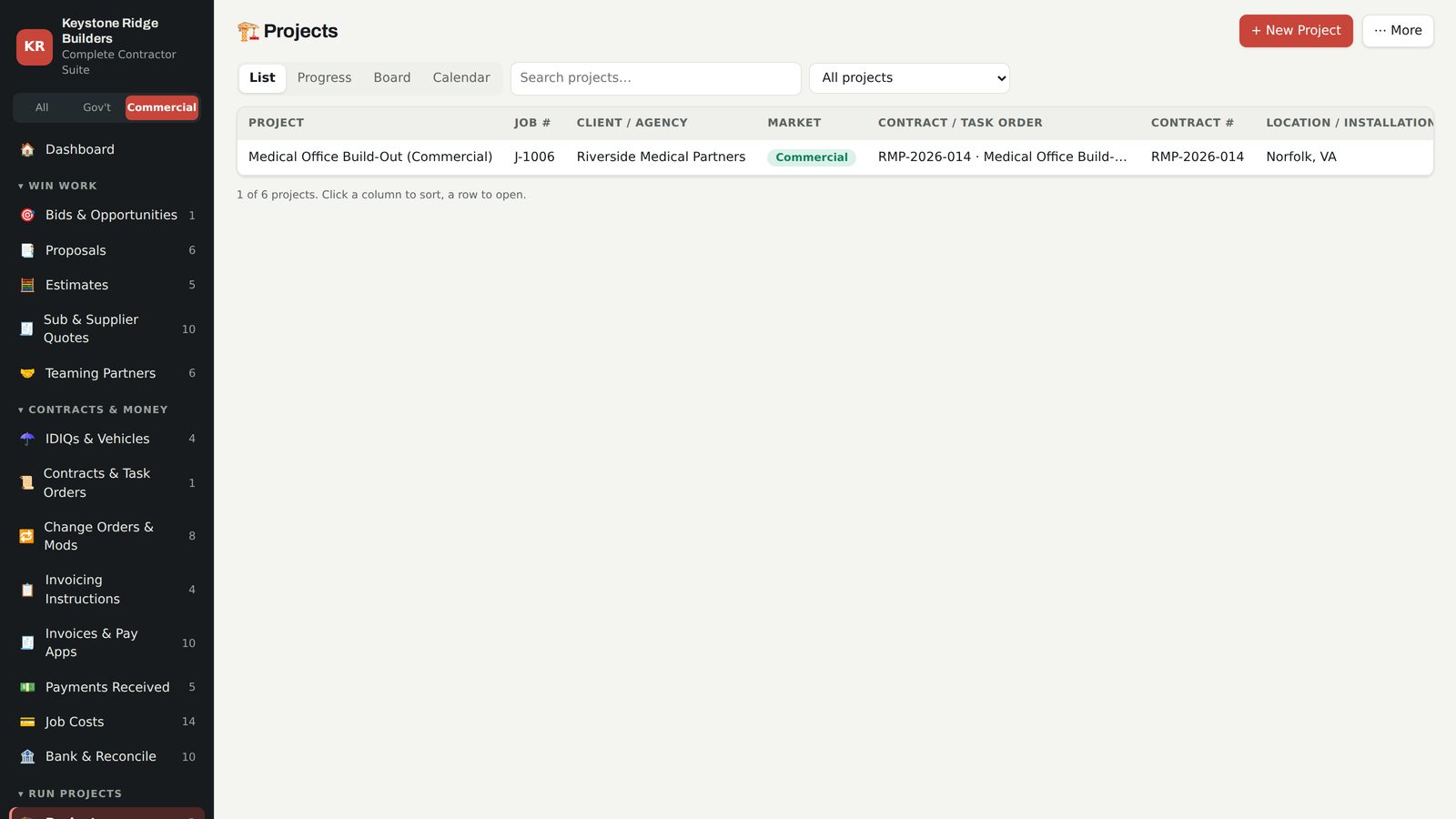
Built for GovCons who also build commercial.
Set the market on each client. Federal and state work shows the government fields — SAM notice, set-aside, wage determination, CO and COR, CPARS. Commercial and private jobs hide them. One switch filters every list and the dashboard.
Pick your apps
Best value · everything linked
Complete Contractor Suite
The whole system for government and commercial construction contractors, fully linked: bids and proposals, IDIQs and task orders, projects with kickoffs, minutes, monthly reports and deliverables, subcontractors and certified payroll, security clearances and site access, invoicing with saved instructions and pay apps, certifications, documents and every POC.
$499 instead of $981 for the nine single apps.
Construction Project Manager
Kickoffs, minutes, monthly reports, deliverables, RFIs, submittals
Run every job from kickoff to closeout: a pre-construction conference checklist, meeting minutes with action items, a monthly progress report builder with a month-by-month dashboard, deliverables, schedule and milestones, RFIs, submittals, change orders, daily reports, safety, punch list and a project directory of government, A/E, consultant and subcontractor POCs.
Tabs: Projects · Kickoff Meetings · Meeting Minutes · Action Items · Monthly Reports · Deliverables · Schedule & Milestones · RFIs · Submittals · Change Orders & Mods · Daily Reports · Safety & Incidents · Punch List & Closeout · Project Directory · Key Contacts / POCs · Documents & Drawings · Clients & Agencies
Bid & Proposal Tracker
SAM.gov and eBuy pipeline, go/no-go, proposals, estimates, sub quotes
Track every bid from sources sought to award: SAM.gov notice ID, eBuy RFQ, solicitation number, vehicle, set-aside and Pwin; score go/no-go; manage proposal volumes, compliance and color reviews; build estimates; level sub quotes; and keep teaming partners and agency contacts in one place. Works for commercial bids too.
Tabs: Bids & Opportunities · Proposals · Estimates · Sub & Supplier Quotes · Teaming Partners · Clients & Agencies · Key Contacts / POCs · Communications Log · Documents & Drawings · plus Subcontractors
Security Clearance & Site Access
Badges, base passes and clearances from request to cleared on site
Save each agency's security and site-access instructions and forms once, reuse them on every job for that client, send the right instructions to employees and subcontractor personnel in one click, and track every person from request to cleared to work on site.
Tabs: Clearance & Site Access · Security Requirements · Employees · Sub Personnel · Subcontractors · Projects · Clients & Agencies · Certifications & Licenses
Invoicing & Pay Apps
Pay apps, retainage, saved invoicing instructions by client and job
Save each client's invoicing instructions — WAWF, IPP, VA FSC, owner portal or AIA G702/G703 — with the documents they require, and reuse them on every new job. Build progress pay apps with retainage, T&M or milestone invoices with Stripe or PayPal pay links, record payments, track job costs and reconcile the bank.
Tabs: Invoicing Instructions · Invoices & Pay Apps · Payments Received · Job Costs · Bank & Reconcile · Projects · Contracts & Task Orders · Clients & Agencies
Subcontractor Manager
Sub compliance, subcontracts, pay apps, certified payroll
Keep subcontractors compliant and paid correctly: SAM, license and insurance expirations, prequalification, subcontracts and change value, sub pay apps with retainage, lien waiver and certified payroll checks, Davis-Bacon weekly payroll tracking and sub personnel.
Tabs: Subcontractors · Sub Personnel · Subcontracts & POs · Sub Pay Apps · Certified Payroll (WH-347) · Certifications & Licenses · Key Contacts / POCs · plus Projects, Clients & Agencies
IDIQ & Contract Tracker
Umbrella IDIQs, task orders, mods, options and capacity
See every umbrella IDIQ, MATOC, SATOC, MACC and BPA you hold, the task orders under each, remaining capacity, ordering periods, option dates, changes and modifications, and CPARS. Commercial master agreements fit too.
Tabs: IDIQs & Vehicles · Contracts & Task Orders · Change Orders & Mods · Projects · Clients & Agencies · Key Contacts / POCs · Bids & Opportunities
Certifications & Compliance
SAM, SBA, licenses, insurance, bonding and training expirations
Never miss a renewal: company registrations and SBA certifications, licenses, insurance and bonding, and employee and subcontractor training and certifications, each with its documents and expiration alerts.
Tabs: Certifications & Licenses · Employees · Subcontractors · Documents & Drawings
Documents & Key Contacts
Drawings, specs, critical files and every POC by job
Store drawings, specifications, contract documents, submittals and photos by job and category, and keep every government, A/E, consultant, prime and subcontractor point of contact with a project directory for each job.
Tabs: Documents & Drawings · Key Contacts / POCs · Project Directory · Communications Log · Projects · Clients & Agencies
Crew, Timesheets & Equipment
Employees, job hours by classification, equipment and fleet
Employees with labor classifications and clearance levels, daily timesheets by job and cost code for Davis-Bacon payrolls, equipment and fleet with service and registration alerts.
Tabs: Employees · Timesheets · Equipment & Fleet · Certifications & Licenses · Certified Payroll (WH-347) · Projects · Clients & Agencies
Set up in fifteen minutes
- Open it. Unzip, double-click the app file, type your company name and your name.
- Brand it once. Logo, color, the address on your documents and your pay link. Every BaseBid app you open uses the same company profile.
- Share it. Pick your team folder in Google Drive, OneDrive, Dropbox or Box. Teammates click Join my team's folder.
- Load your lists. Clients and agencies (with their market), key contacts, subs and employees.
- Save instructions once. Each client's invoicing instructions and each agency's site-access requirement.
- Run the job. Project, kickoff, minutes, monthly reports, access requests, pay apps and weekly payroll.
Questions
Is this a subscription?
No. BaseBid Command is a one-time purchase. There is no monthly fee, no account and no renewal.
How does it run?
Each app is a single file that opens in Chrome, Edge, Safari or Firefox on Windows or Mac. No installation and no account. Your records and uploaded files stay on your computers and in your own team folder — never on our servers.
Can my team use it?
Yes. On first launch, choose a shared team folder in Google Drive, OneDrive or SharePoint, Dropbox, Box, iCloud or a network drive. To add a teammate, share the BaseBid Data folder with them, send them the same app file, and they click Join my team's folder. Everyone works from the same data at the same time. Edits combine record by record, the newest edit to a record wins, and each record shows who changed it last. One purchase covers everyone in your company. Team folders need Chrome or Edge on a computer.
How do I go back to an earlier version?
A version is saved automatically when each person starts a session, every hour while editing, and before any restore, erase or reset. You can also save a named version, such as "Before March pay app". Settings → Team folder & versions lists them by date, time and who saved them; click Restore and the whole team goes back, with the replaced data kept as a version too. Every version file also opens with Restore from backup in any browser.
How do I keep my data safe?
With a team folder, your drive holds the live data plus up to 250 automatic versions (60 by default), and named versions are never deleted. Working alone? Click Back up now each week. Backups include your uploaded files and restore on any computer.
Do I have to set up my logo and business details in every app?
No. Your company name, logo, brand color, printed address and footer, and payment details are a company profile. Set them once and every BaseBid Command app you open picks them up, on your computer and on your teammates' computers through the team folder. Change them in any app and the others follow. An app that needs different branding, such as a division or DBA, can turn off Use my company profile. Custom fields and tabs are set per app, because each app has different tabs.
Does each app need its own folder?
Each app creates its own folder inside BaseBid Data automatically, so restoring or resetting one app never touches another. Apps on the same computer can reuse the same BaseBid Data folder with one click.
Does it work for commercial jobs?
Yes. Every client carries a market setting — Federal, State & Local, Commercial or Private — and government-only fields appear only where they apply.
Does it submit to WAWF, LCPtracker or agency portals?
No. It prepares and tracks the work — pay apps, certified payrolls, access requests — and keeps each client's submission instructions beside the record. You submit through the government's or owner's own system.
Does email and payment work?
Emails open as drafts in Outlook, Gmail or your computer's mail app, filled in from templates. Invoices print with your Stripe, PayPal, Square, Venmo or Cash App link and a QR code. The app never sends email on its own or handles card details.
Do I need AI to use it?
No. The AI assistant is optional and off until you connect your own provider. With AI off, every feature except the ✨ buttons works exactly the same, including the SAM.gov and USAspending lookups, import and the agency directory.
What does the AI cost, and where does my data go?
AI provider fees apply if you use it. Claude, ChatGPT, Gemini and Grok bill you directly under their own API pricing, usually a cent or two per draft; long solicitations and web research cost more. Ollama runs on your computer and is free. A record is sent to the provider you pick only when you click a ✨ button, straight from your browser. Your key stays in your browser and never goes into your records, backups, exports or team folder. IDs, pay rates, clearance details and injury details are never sent.
Which data files are included?
All of them: Vehicles & Teaming Index, GSA Lease Refresh Watchlist, VA Capital Plan Outyear, PBS Prospectus Tracker, 12-Month Recompete Calendar, Agency Directory and the HTRO and PBS grader kits, each with its CRM import pack. New editions released in the 12 months after you buy are included. After that, new editions come with Base Bid Pro or the annual data subscription.
Can I bring in my existing records?
Yes. On any tab, More → Import takes Excel, CSV, contact cards (.vcf) and zip files. Columns from Outlook, Google, LinkedIn, QuickBooks, Procore, BuildingConnected, payroll systems, SAM.gov and USAspending line up automatically. You tick the rows you want. Importing a newer file later updates the same records and keeps your edits. Columns that look private, such as SSN, tax ID or bank details, are skipped.
How do updates work?
Every new version released in the 12 months after you buy is free, including major versions, and security fixes for your version are always free. For the next 3 years, upgrades are 50% off list; after that, upgrades are full price. Updates never force a subscription. To update, back up, replace the app file with the new one in the same place, and open it in the same browser. Your records, custom fields, branding and AI key stay exactly as they were. We may change these terms for new versions at any time; the terms when you buy apply to the version you get.
What do the version numbers mean?
We number releases like 1.4.0: the last number is fixes, the middle number is new features, and the first number is a major change we announce at least 90 days ahead. Data files show an edition such as 2026.09, and a newer edition imports into the same records without making copies.
Can I try it first?
Yes. Every app has a live demo with fictional sample data that runs right in your browser.
Which one should I buy?
If you run more than two of these areas, the Complete Contractor Suite is the better buy: 41 linked tabs for $499, against $981 for the single apps bought separately.
BaseBid Command is record-keeping software. It is not legal, contracting, labor-compliance, security or accounting advice, and it does not replace the solicitation, the contract, the wage determination or an agency's current instructions. AI output is a suggestion; review it before you use it. See updates and versions. Not affiliated with or endorsed by any government agency. Questions before you buy? Contact us. New to federal work? Our Federal Construction Contracting course walks through the whole lifecycle.